
Features
Everything between a new lead and a paid invoice.
Six stages every sales team runs. Here's how CRM Master handles each one — shown in the real product.
01 / 06 · LEAD CAPTURE
Every enquiry, in one queue, with an owner.
Leads arrive from ads, directories, forms and sheets — and wait in each of them until someone copies them over.
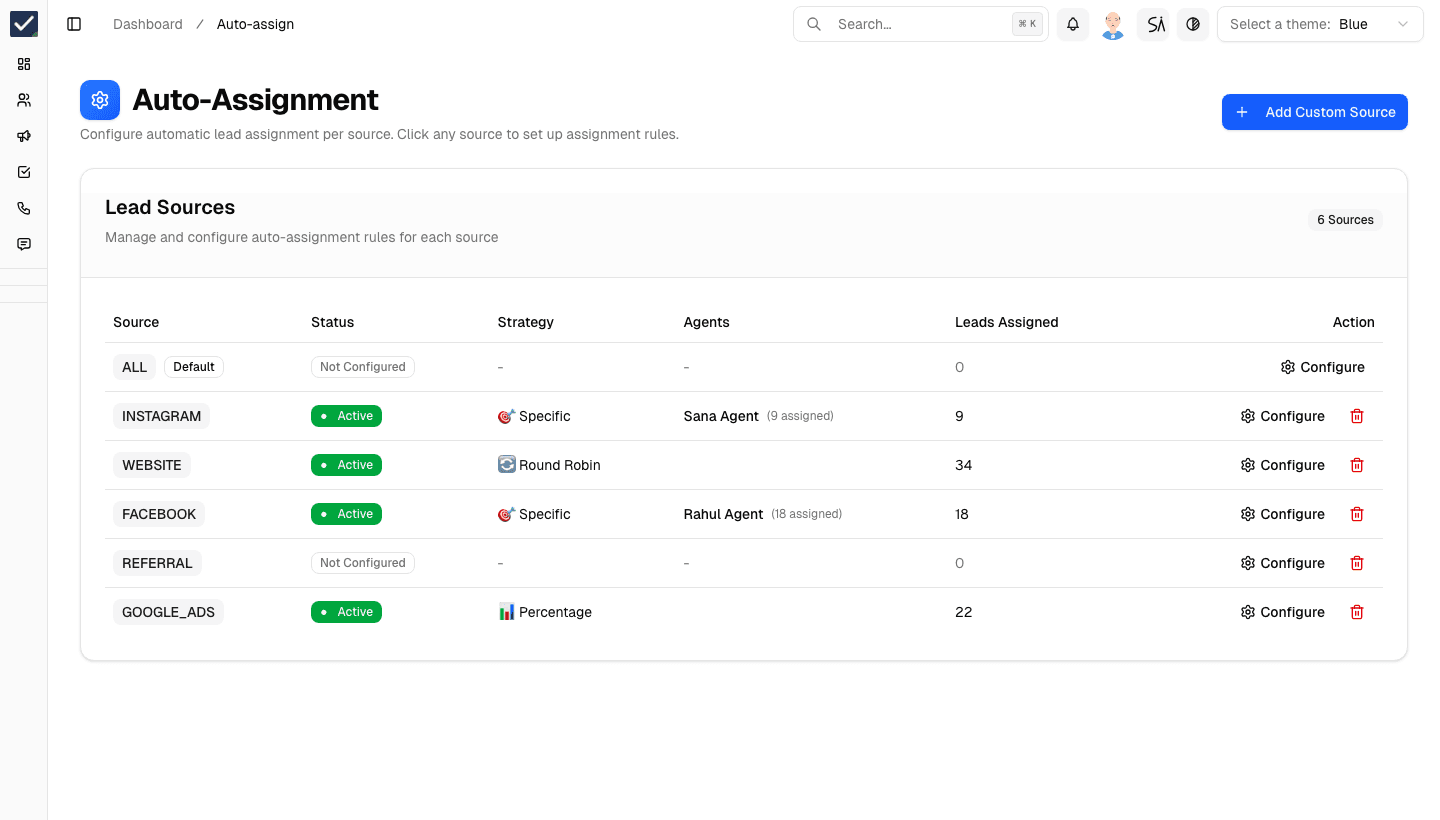
CRM Master pulls every source into one lead list and assigns each lead the moment it arrives.
- Native lead sources
- Meta Lead Ads, Justdial and Google Sheets connect without code.
- Universal webhook
- Anything else — website, Pabbly, n8n, Zapier, Make — posts straight in.
- Auto-assignment per source
- A specific agent, round-robin or a percentage split, set per source.
- Lead capture forms & import
- Hosted forms for campaigns, CSV import for what you already have, duplicates merged.
02 / 06 · CALLING
Call from the CRM. Every call, recorded and logged.
Agents call from personal phones. Nothing is recorded, outcomes are forgotten, and nobody can coach what they can't hear.
Click-to-call from the lead, with the recording, duration and outcome saved to the lead automatically.
- Click-to-call with CallerDesk
- Dial from the lead record; recordings and live call status flow back.
- Calling campaigns
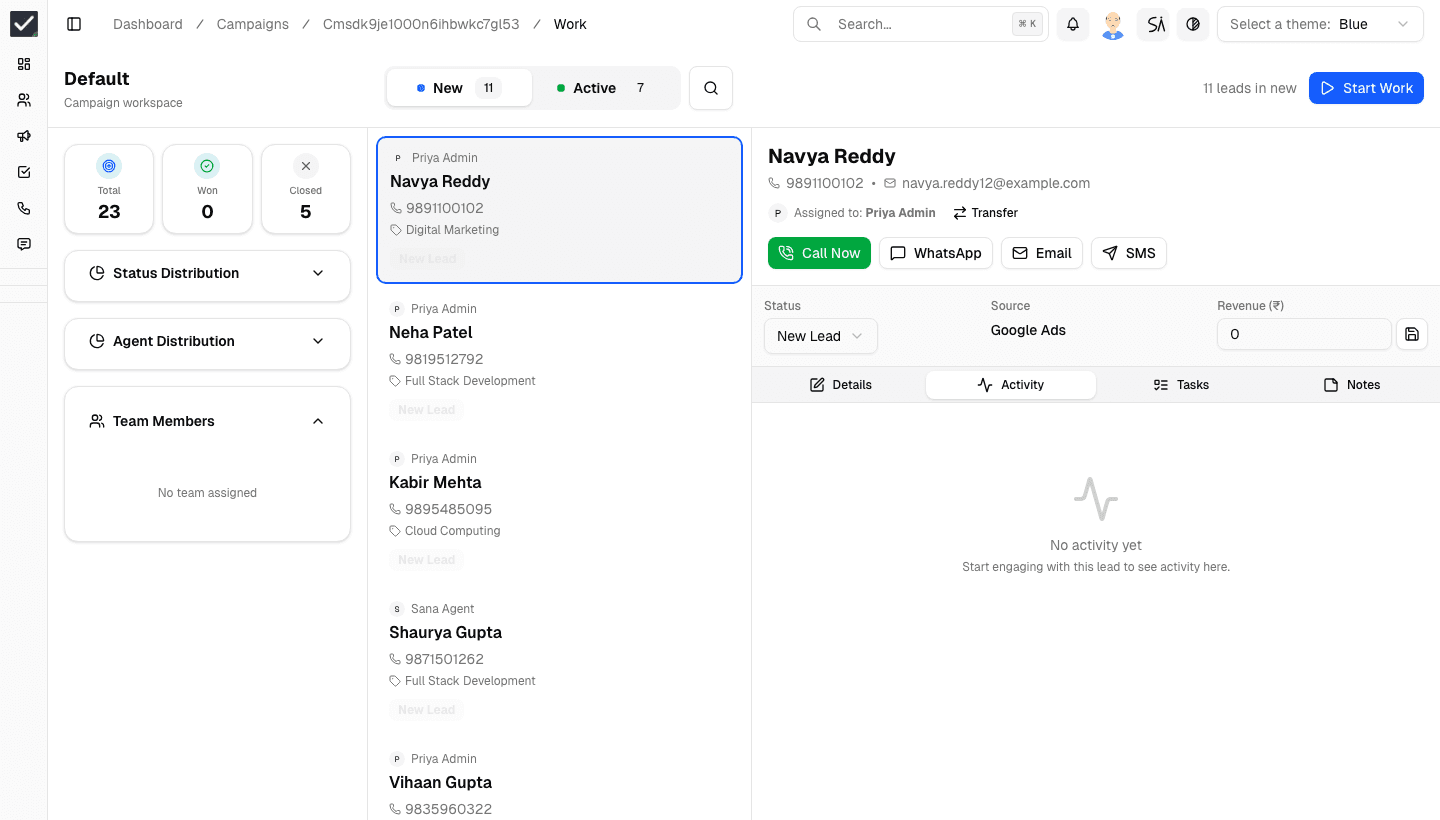
- Agents work a prioritised queue: call, log the outcome, next lead.
- Android app
- Field agents call and update leads from their phone; calls are logged the same way.
- After-call outcome
- When a call ends, the agent logs the outcome and next step in one tap.
03 / 06 · FOLLOW-UPS
The next step is always scheduled — by the system.
“Call me next week” gets written in a notebook, and next week nobody calls.
Tasks, reminders and messages are created from what happens on the lead, so follow-ups don't depend on memory.
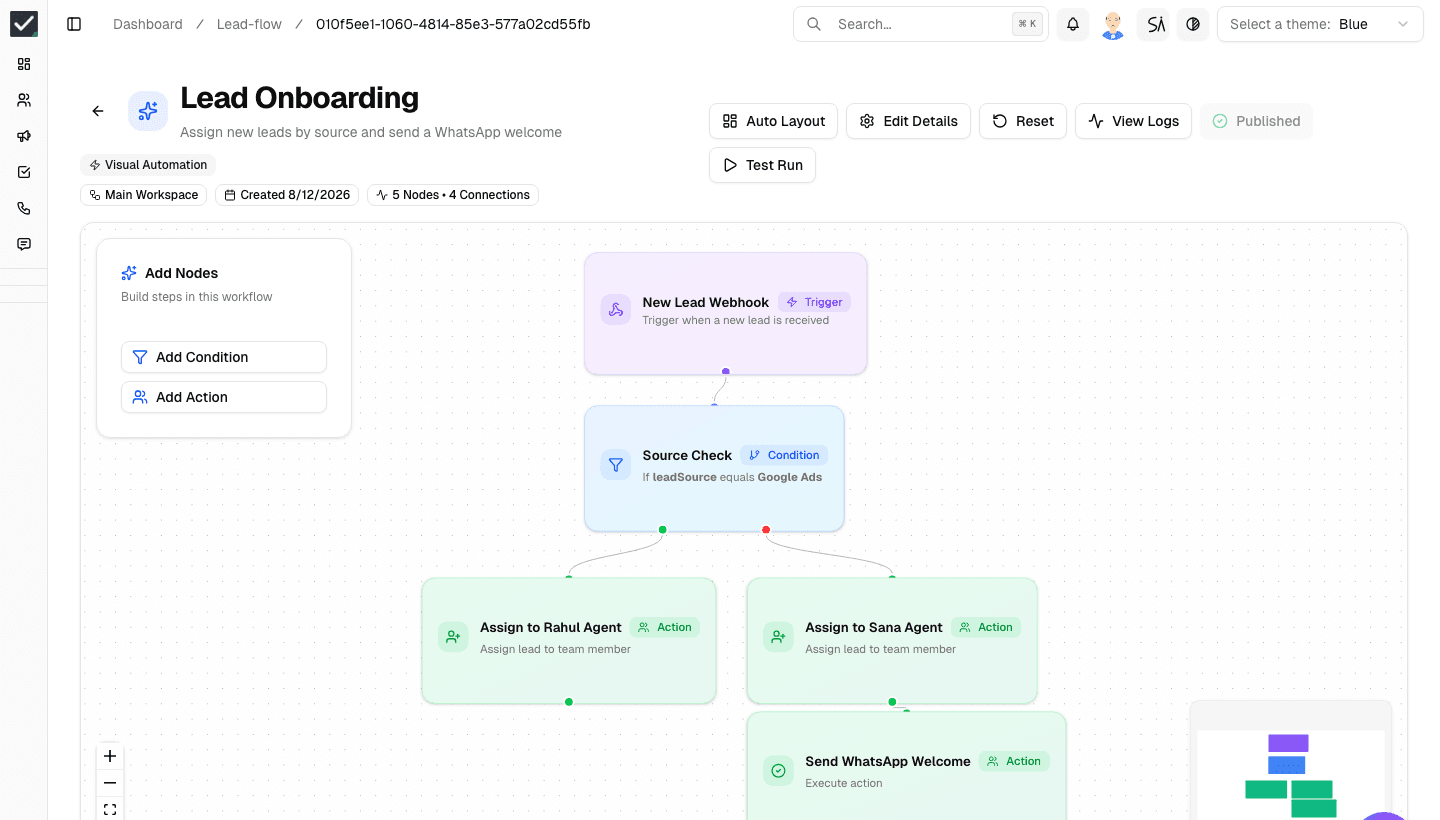
- Visual workflow builder
- Triggers, conditions and actions — assign, tag, message, move stage.
- Automatic tasks
- A stage change or call outcome creates the next task with a due time.
- Schedules & demos
- Book demos and meetings with Google Meet links from the lead.
- WhatsApp triggers
- Send the right template automatically when a lead reaches a stage.
04 / 06 · WHATSAPP
WhatsApp on the lead, not on an agent's phone.
Conversations sit on personal numbers. When an agent leaves, so does every chat they had with your customers.
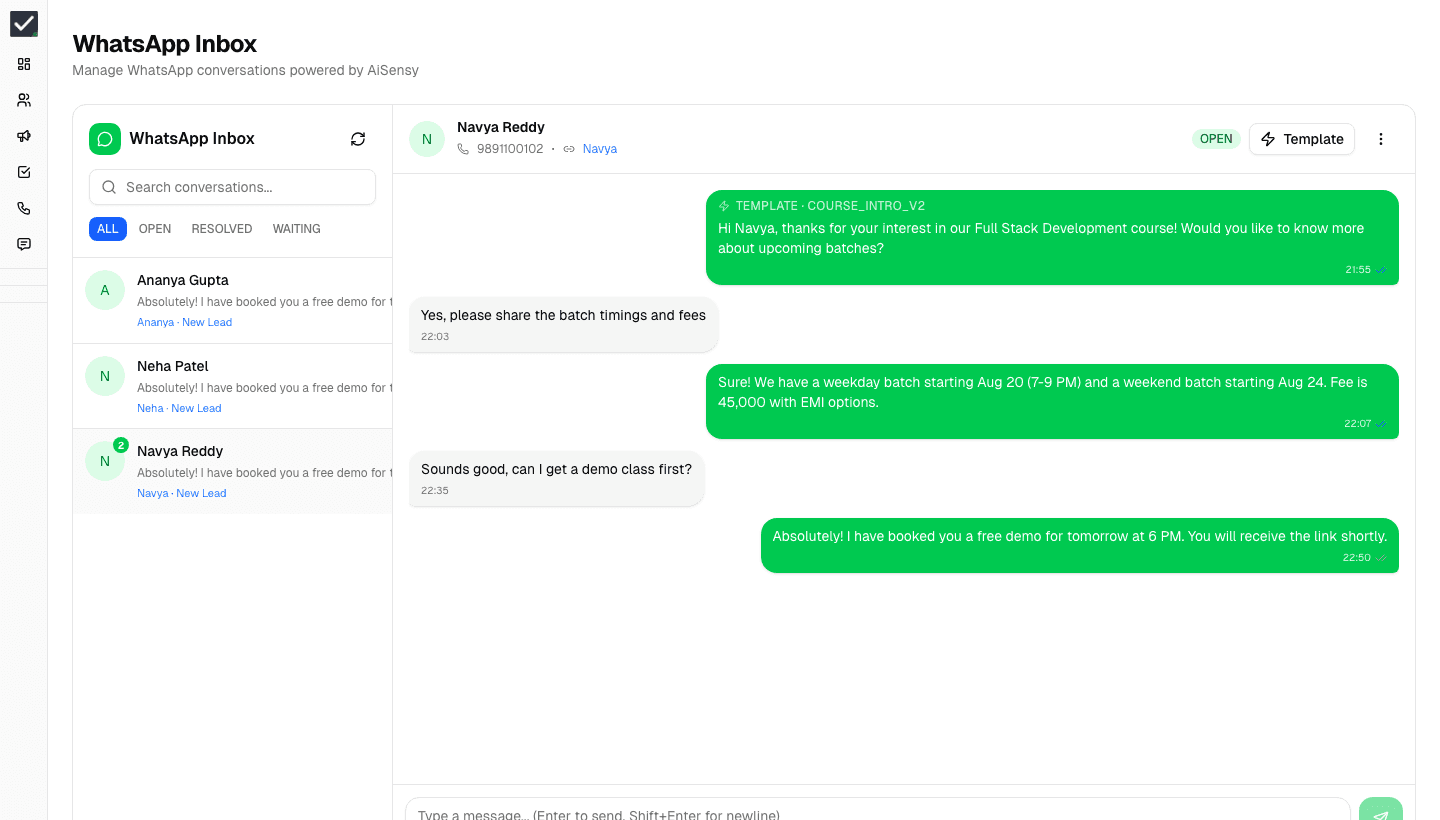
A shared WhatsApp inbox tied to each lead, plus template campaigns — through the provider you already use.
- Team inbox
- Every chat attached to its lead, visible to the owner and their manager.
- Templates & campaigns
- Approved templates, broadcasts and drips by lead stage.
- Canned replies
- Saved answers for the questions your team gets every day.
- Bring your provider
- AiSensy, DoubleTick or WACA. Wati and Interakt are on the way.
05 / 06 · DEALS & PAYMENTS
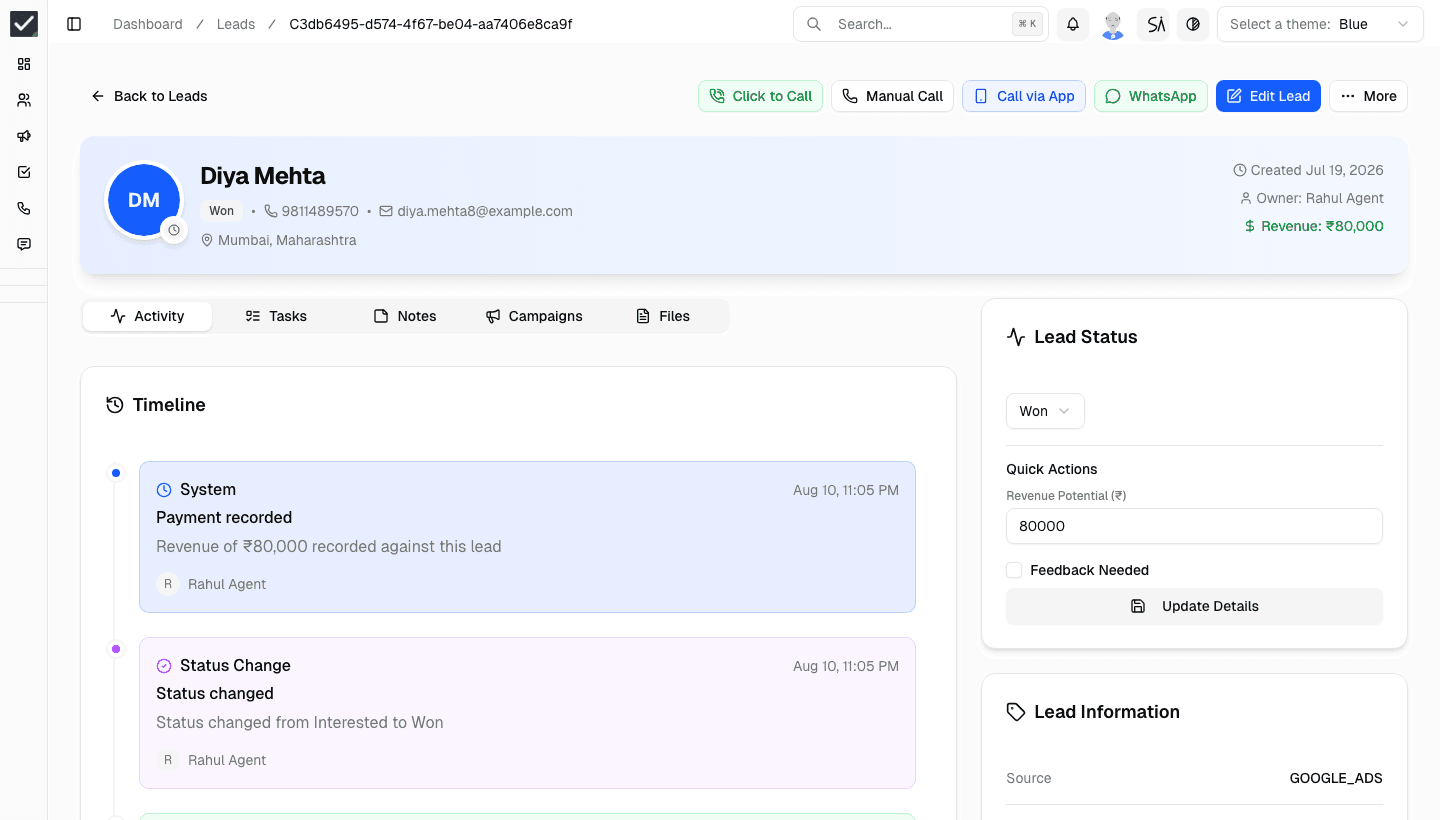
From first call to payment, on one timeline.
The deal is in the CRM, the payment is in another dashboard, and nobody can say which lead actually paid.
Every call, message, stage change and payment is recorded on the lead, so revenue ties back to the agent and the source.
- Activity timeline
- Calls, notes, WhatsApp, stage changes and payments in order.
- Your stages, your fields
- Custom lead statuses and fields that match how you sell.
- Razorpay payments
- Payments made through Razorpay links are recorded against the lead.
- Revenue per lead
- Deal value and collected revenue recorded where the work happened.
06 / 06 · VISIBILITY
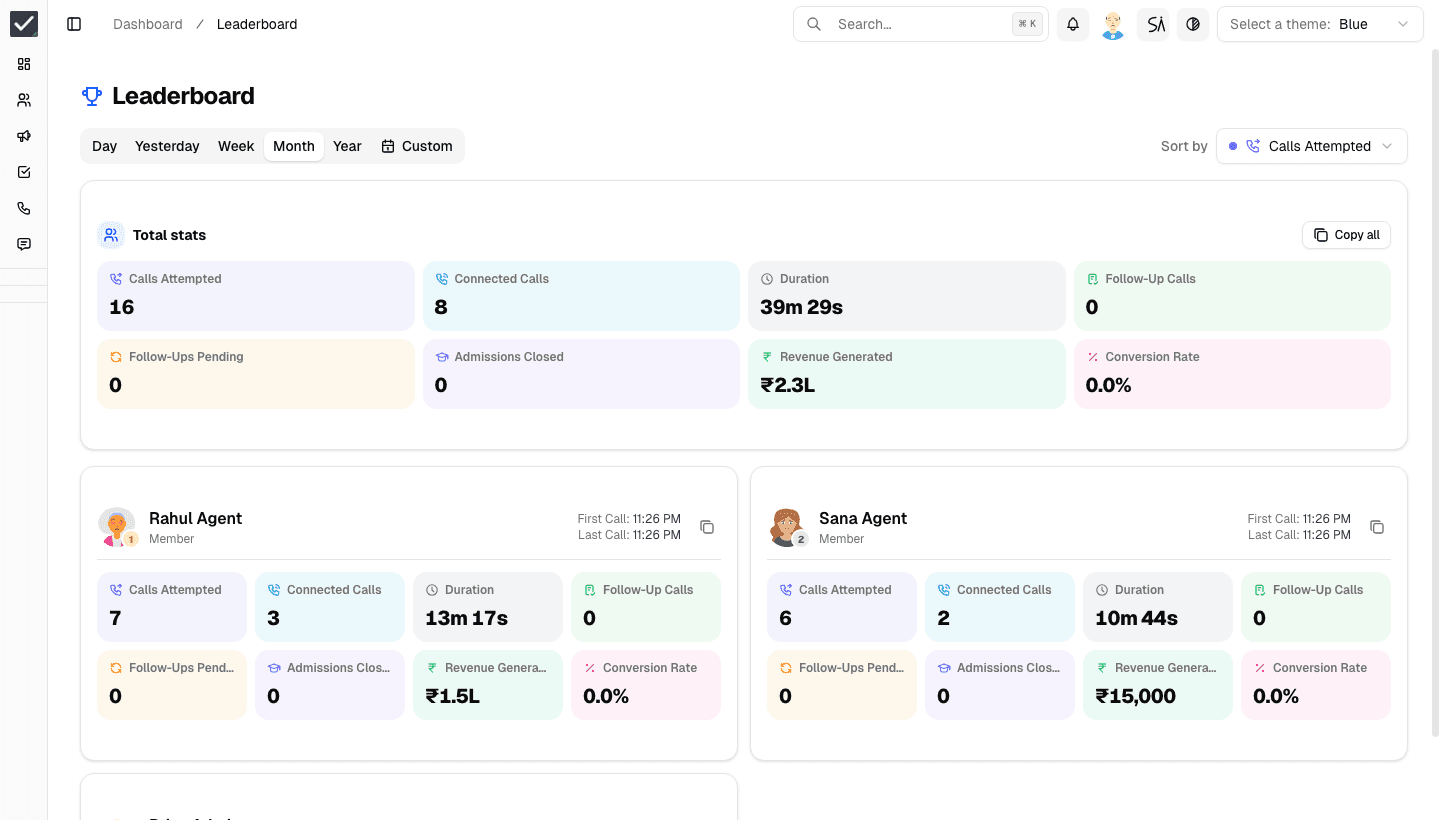
Know how the month is going — today.
Performance lives in an end-of-day spreadsheet, so problems show up after the month is over.
Live dashboards, leaderboards and reports built from the work itself — not from what agents remember to report.
- Leaderboard
- Calls, connects, talk time, follow-ups and revenue per agent.
- Call analytics
- Connect rate, outcomes and duration by day, week or custom range.
- Reports
- Conversion by source, campaign and owner.
- Attendance & location
- Check-ins and field location for teams that sell on the ground.
Integrations
Connected to where your leads, calls and payments already are.
The ones marked Live work in the product today. Anything else can reach CRM Master through the webhook.

Meta Lead Ads
Lead source · Live
Facebook and Instagram lead forms land in your pipeline instantly.

Justdial
Lead source · Live
Justdial enquiries captured with field mapping built in.

Google Sheets
Lead source · Live
New rows in your sheet arrive as leads, mapped to your fields.

CallerDesk
Telephony · Live
Click-to-call, call recording and live call status.

AiSensy
WhatsApp · Live
WhatsApp Business API campaigns and templates.

Wati
WhatsApp · Coming soon
Connect your Wati account today; sending from CRM Master is on the way.

Interakt
WhatsApp · Coming soon
Connect your Interakt account today; sending from CRM Master is on the way.

DoubleTick
WhatsApp · Live
WhatsApp conversations synced with the CRM.

WACA
WhatsApp · Live
WhatsApp Cloud API messaging and approved templates.

Razorpay
Payments · Live
Payments made through Razorpay links are recorded on the lead.

Google Meet
Meetings · Live
Schedule demos with Meet links from the lead record.

Pabbly & n8n
Webhook · Live
Pabbly, n8n, Zapier or Make post leads to your CRM Master webhook.
SID AI · built in
Ask your CRM a question. Get the answer, not a report.
SID AI reads your live pipeline. Ask in plain English and it answers with the actual numbers and charts, or drafts the workflow for you to review.
- Answers from your own leads, calls and payments
- Charts and tables, with exact figures
- Drafts automation workflows from a sentence
SID AI runs on AI credits.
SID AI
Reading your workspace
Which lead source converted best this month?
Meta Lead Ads converted best this month.
Lead → won · this month · demo data
Control
Your leads stay yours — even when people move on.
Leads are your most valuable data. Decide exactly what each person can see and do, and keep every conversation on the company's record.
Roles & permissions
Decide who can see all leads, assign them, call, or open reports.
Hidden phone numbers
Agents can call and work a lead without ever seeing the digits.
Workspaces
Separate pipelines for branches, teams or brands under one account.
Field teams
Attendance and location for agents who sell outside the office.
FAQ
Frequently asked questions
Meta Lead Ads, Justdial and Google Sheets connect natively. Your website and any other tool (Pabbly, n8n, Zapier, Make) can send leads to CRM Master's webhook, and you can import a CSV of existing leads.
You set a rule per lead source: always a specific agent, round-robin across a team, or a percentage split. New leads are assigned the moment they arrive.
Yes. The CRM Master Android app lets agents call leads, log outcomes and update records from the field. Everything syncs with the web app.
AiSensy, DoubleTick and WACA send messages from CRM Master today, and conversations and template messages are attached to the lead they belong to. You can connect Wati and Interakt accounts now; sending through them is on the way.
Yes. Number visibility is a per-user permission. Agents without it can still call and work the lead — they just never see the digits.
See it on your own leads.
Create your workspace and bring your leads in. We'll help you set up sources, assignment and calling.